-
Notifications
You must be signed in to change notification settings - Fork 120
tutorial hierarchical zarr stores #361
New issue
Have a question about this project? Sign up for a free GitHub account to open an issue and contact its maintainers and the community.
By clicking “Sign up for GitHub”, you agree to our terms of service and privacy statement. We’ll occasionally send you account related emails.
Already on GitHub? Sign in to your account
Open
eni-awowale
wants to merge
14
commits into
xarray-contrib:main
Choose a base branch
from
eni-awowale:fundamentals-rio-backend
base: main
Could not load branches
Branch not found: {{ refName }}
Loading
Could not load tags
Nothing to show
Loading
Are you sure you want to change the base?
Some commits from the old base branch may be removed from the timeline,
and old review comments may become outdated.
+8,419
−10,729
Open
Changes from all commits
Commits
Show all changes
14 commits
Select commit
Hold shift + click to select a range
7baf892
tutorial hierarchical zarr stores
eni-awowale 56706f7
merge main
eni-awowale a42f7f0
[pre-commit.ci] auto fixes from pre-commit.com hooks
pre-commit-ci[bot] 5b66040
sync lock file
eni-awowale 352a4bf
style: formating of headers
eni-awowale 5654ebf
[pre-commit.ci] auto fixes from pre-commit.com hooks
pre-commit-ci[bot] 101576b
spelling
eni-awowale 06f8aed
spelling rip
eni-awowale 9cf6efb
spelling
eni-awowale aae9fa2
pr suggestions and some clean up
eni-awowale 844cdf7
[pre-commit.ci] auto fixes from pre-commit.com hooks
pre-commit-ci[bot] 6b3ee23
adding to toc
eni-awowale 0c2b651
Merge branch 'fundamentals-rio-backend' of https://github.com/eni-awo…
eni-awowale 175673b
updated _toc correctly this time
eni-awowale File filter
Filter by extension
Conversations
Failed to load comments.
Loading
Jump to
Jump to file
Failed to load files.
Loading
Diff view
Diff view
There are no files selected for viewing
This file contains hidden or bidirectional Unicode text that may be interpreted or compiled differently than what appears below. To review, open the file in an editor that reveals hidden Unicode characters.
Learn more about bidirectional Unicode characters
This file contains hidden or bidirectional Unicode text that may be interpreted or compiled differently than what appears below. To review, open the file in an editor that reveals hidden Unicode characters.
Learn more about bidirectional Unicode characters
| Original file line number | Diff line number | Diff line change |
|---|---|---|
| @@ -0,0 +1,331 @@ | ||
| { | ||
|
eni-awowale marked this conversation as resolved.
eni-awowale marked this conversation as resolved.
eni-awowale marked this conversation as resolved.
eni-awowale marked this conversation as resolved.
|
||
| "cells": [ | ||
| { | ||
| "cell_type": "markdown", | ||
| "id": "0", | ||
| "metadata": {}, | ||
| "source": [ | ||
| "# Zarr Stores with Xarray\n", | ||
| "\n", | ||
| "## Learning Objectives:\n", | ||
| "- Learn about the Zarr data format and xarray's \"zarr\" backend engine\n", | ||
| "- Learn how to read a Zarr store with a hierarchical structure with `xr.DataTree`\n", | ||
| "- Learn how to select dask arrays from a Zarr store\n", | ||
| "- Explore how to use Zarr stores with xarray for computations and visualizations\n", | ||
| "\n", | ||
| "## What is Zarr?\n", | ||
| "\n", | ||
| "The Zarr data format is an open, community-maintained format designed for efficient, scalable storage of large N-dimensional arrays. It stores data as compressed and chunked arrays in a format well-suited to parallel processing and cloud-native workflows. Xarray’s Zarr backend allows xarray to leverage these capabilities, including the ability to store and analyze datasets far too large fit onto disk (particularly in combination with [dask](https://docs.xarray.dev/en/latest/user-guide/dask.html#dask)).\n", | ||
| "\n", | ||
| "### Zarr Data Organization:\n", | ||
| "- **Arrays**: N-dimensional arrays that can be chunked and compressed.\n", | ||
| "- **Groups**: A container for organizing multiple arrays and other groups with a hierarchical structure.\n", | ||
| "- **Metadata**: JSON-like metadata describing the arrays and groups, including information about data types, dimensions, chunking, compression, and user-defined key-value fields. \n", | ||
| "- **Dimensions and Shape**: Arrays can have any number of dimensions, and their shape is defined by the number of elements in each dimension.\n", | ||
| "- **Coordinates & Indexing**: Zarr supports coordinate arrays for each dimension, allowing for efficient indexing and slicing.\n", | ||
| "\n", | ||
| "The diagram below from [the Zarr v3 specification](https://wiki.earthdata.nasa.gov/display/ESO/Zarr+Format) showing the structure of a Zarr store:\n", | ||
| "\n", | ||
| "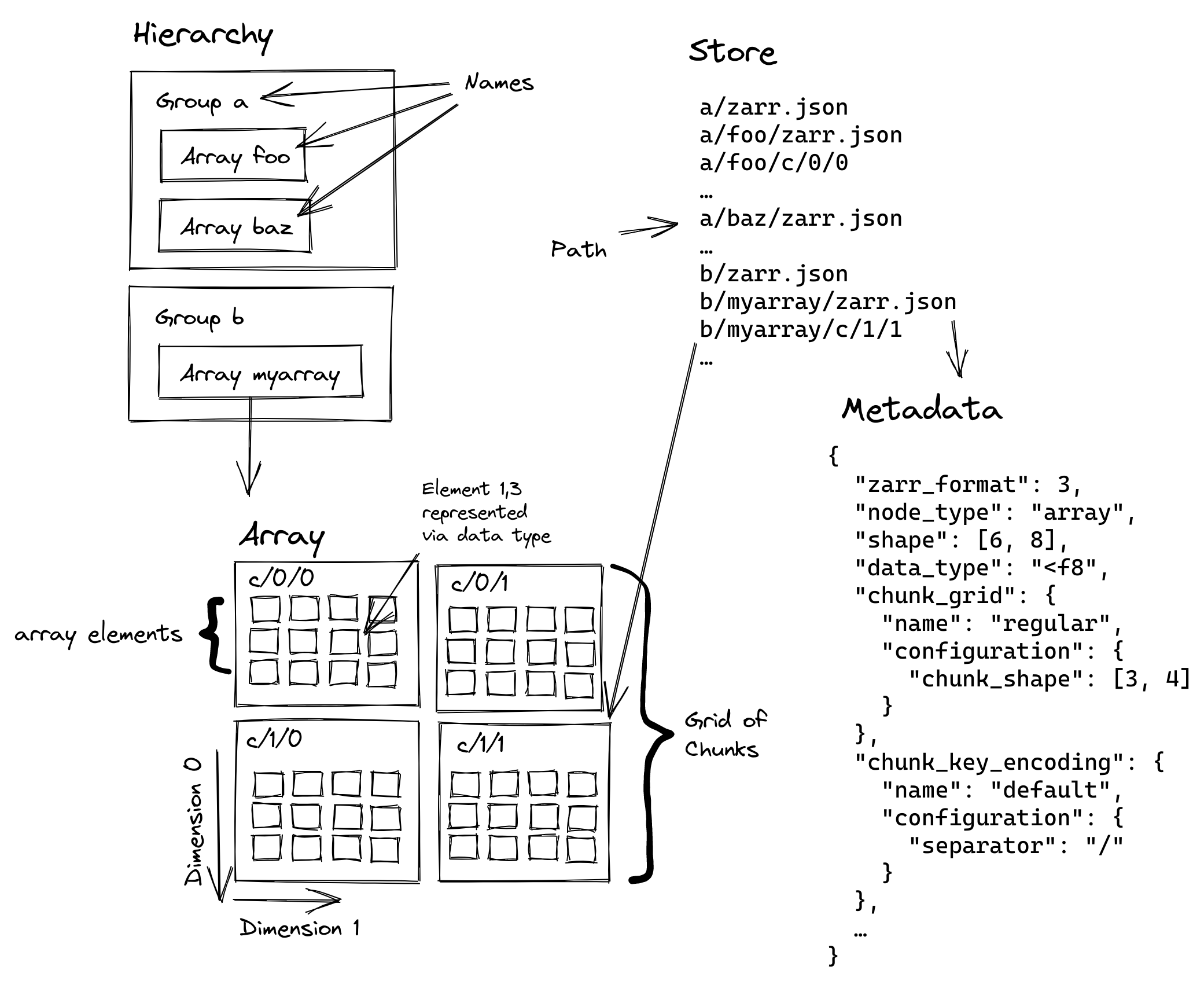\n", | ||
| "\n", | ||
| "\n", | ||
| "NetCDF and Zarr share similar terminology and functionality, but the key difference is that NetCDF is a single file, while Zarr is a directory-based “store” composed of many chunked files, making it better suited for distributed and cloud-based workflows." | ||
| ] | ||
| }, | ||
| { | ||
| "cell_type": "markdown", | ||
| "id": "1", | ||
| "metadata": {}, | ||
| "source": [ | ||
| "## Reading a zarr store\n", | ||
| "\n", | ||
| "With xarray's \"zarr\" backend, we can read data from cloud storage buckets. The Zarr store we will be using for this tutorial has groups: \"observed\" and \"reanalysis\", each containing a \"precipitation\" data variable derived from *[GPM_3IMERGHH_07](https://disc.gsfc.nasa.gov/datasets/GPM_3IMERGHH_07/summary)* and *[M2T1NXFLX_5.12.4](https://disc.gsfc.nasa.gov/datasets/M2T1NXFLX_5.12.4/summary)* products, respectively.\n", | ||
| "\n", | ||
| "Let's read in our zarr store as an `xr.DataTree`. " | ||
| ] | ||
| }, | ||
| { | ||
| "cell_type": "code", | ||
| "execution_count": null, | ||
| "id": "2", | ||
| "metadata": {}, | ||
| "outputs": [], | ||
| "source": [ | ||
| "import xarray as xr\n", | ||
| "\n", | ||
| "precipitation_store = \"https://pub-45a1d62ac8d94c4c89f4dc63681a98ed.r2.dev/precipitation.zarr\"\n", | ||
| "\n", | ||
| "precip_dt = xr.open_datatree(precipitation_store, engine=\"zarr\", chunks={}, consolidated=True)" | ||
| ] | ||
| }, | ||
| { | ||
| "cell_type": "markdown", | ||
| "id": "3", | ||
| "metadata": {}, | ||
| "source": [ | ||
| ":::{note} We selected `\"zarr\"` backend engine, which tells xarray to load and decode a dataset from a Zarr store. The `chunks={}` parameter is used to load the data into a dask array. And `consolidated=True` enables zarr’s consolidated metadata capability. This lets us read all of the metadata from a single file which can improve performance.\n", | ||
| ":::" | ||
| ] | ||
| }, | ||
| { | ||
| "cell_type": "markdown", | ||
| "id": "4", | ||
| "metadata": {}, | ||
| "source": [ | ||
| "## Variable selection\n", | ||
| "With our `DataTree` object, we can select variables from our Zarr store with either dictionary and or attribute like syntax." | ||
| ] | ||
| }, | ||
| { | ||
| "cell_type": "markdown", | ||
| "id": "5", | ||
| "metadata": {}, | ||
| "source": [ | ||
| "### Dictionary-like interface" | ||
| ] | ||
| }, | ||
| { | ||
| "cell_type": "code", | ||
| "execution_count": null, | ||
| "id": "6", | ||
| "metadata": {}, | ||
| "outputs": [], | ||
| "source": [ | ||
| "precip_dt[\"observed/precipitation\"]" | ||
| ] | ||
| }, | ||
| { | ||
| "cell_type": "markdown", | ||
| "id": "7", | ||
| "metadata": {}, | ||
| "source": [ | ||
| "### Attribute-like access" | ||
| ] | ||
| }, | ||
| { | ||
| "cell_type": "code", | ||
| "execution_count": null, | ||
| "id": "8", | ||
| "metadata": {}, | ||
| "outputs": [], | ||
| "source": [ | ||
| "precip_dt.observed.precipitation" | ||
| ] | ||
| }, | ||
| { | ||
| "cell_type": "markdown", | ||
| "id": "9", | ||
| "metadata": {}, | ||
| "source": [ | ||
| "### Dictionary and Attribute like access" | ||
| ] | ||
| }, | ||
| { | ||
| "cell_type": "code", | ||
| "execution_count": null, | ||
| "id": "10", | ||
| "metadata": {}, | ||
| "outputs": [], | ||
| "source": [ | ||
| "precip_dt.observed[\"precipitation\"]" | ||
| ] | ||
| }, | ||
| { | ||
| "cell_type": "markdown", | ||
| "id": "11", | ||
| "metadata": {}, | ||
| "source": [ | ||
| ":::{note} All of these variable selection options return the same \"precipitation\" `xr.DataArray` object, as a chunked `dask.Array`, from the \"observed\" group of our Zarr store.\n", | ||
| ":::" | ||
| ] | ||
| }, | ||
| { | ||
| "cell_type": "markdown", | ||
| "id": "12", | ||
| "metadata": {}, | ||
| "source": [ | ||
| "## Time slicing\n", | ||
| "\n", | ||
| "We can index and subset by time on our `xr.DataTree` object. Each time slice in our Zarr store represents one hour of data with a total of 10 hours of data.\n", | ||
| "\n", | ||
| "Let's explore the different ways we can get the first 5 hours of data. " | ||
| ] | ||
| }, | ||
| { | ||
| "cell_type": "markdown", | ||
| "id": "13", | ||
| "metadata": {}, | ||
| "source": [ | ||
| "### Label-based indexing" | ||
| ] | ||
| }, | ||
| { | ||
| "cell_type": "markdown", | ||
| "id": "14", | ||
| "metadata": {}, | ||
| "source": [ | ||
| "Let's try getting the first 5 hours of data with `.sel(time=)`. \n", | ||
| "\n", | ||
| "Since the time slices are ordered we can get a subset of the array of our time coordinate and pass it to the `.sel` method." | ||
| ] | ||
| }, | ||
| { | ||
| "cell_type": "code", | ||
| "execution_count": null, | ||
| "id": "15", | ||
| "metadata": {}, | ||
| "outputs": [], | ||
| "source": [ | ||
| "time_index = precip_dt.time[0:5]\n", | ||
| "precip_dt.sel(time=time_index)" | ||
| ] | ||
| }, | ||
| { | ||
| "cell_type": "markdown", | ||
| "id": "16", | ||
| "metadata": {}, | ||
| "source": [ | ||
| "### Datetime indexing\n", | ||
| "We can also subset by time with a `datetime` string." | ||
| ] | ||
| }, | ||
| { | ||
| "cell_type": "code", | ||
| "execution_count": null, | ||
| "id": "17", | ||
| "metadata": {}, | ||
| "outputs": [], | ||
| "source": [ | ||
| "precip_dt.sel(time=slice(\"2021-08-29T07:30:00\", \"2021-08-29T16:30:00\"))" | ||
| ] | ||
| }, | ||
| { | ||
| "cell_type": "markdown", | ||
| "id": "18", | ||
| "metadata": {}, | ||
| "source": [ | ||
| "### Positional Indexing\n", | ||
| "Or by the index of our time dimension `.isel(time=slice())`" | ||
| ] | ||
| }, | ||
| { | ||
| "cell_type": "code", | ||
| "execution_count": null, | ||
| "id": "19", | ||
| "metadata": {}, | ||
| "outputs": [], | ||
| "source": [ | ||
| "precip_dt.isel(time=slice(0, 5))" | ||
| ] | ||
| }, | ||
| { | ||
| "cell_type": "markdown", | ||
| "id": "20", | ||
| "metadata": { | ||
| "vscode": { | ||
| "languageId": "plaintext" | ||
| } | ||
| }, | ||
| "source": [ | ||
| "## Chunking\n", | ||
| "Chunking is the process of dividing arrays into smaller pieces, which allows for parallel processing and efficient storage.\n", | ||
| "\n", | ||
| "To examine the chunks in our Zarr store, with `xarray` you can use the `chunks` attribute on the `xr.DataArray` object." | ||
| ] | ||
| }, | ||
| { | ||
| "cell_type": "code", | ||
| "execution_count": null, | ||
| "id": "21", | ||
| "metadata": {}, | ||
| "outputs": [], | ||
| "source": [ | ||
| "precip_dt.observed[\"precipitation\"].data.chunks" | ||
| ] | ||
| }, | ||
| { | ||
| "cell_type": "markdown", | ||
| "id": "22", | ||
| "metadata": {}, | ||
| "source": [ | ||
| "### Selecting by chunks\n", | ||
| "\n", | ||
| "Since we loaded our data as a `dask.Array`, we can access data from each chunked array in our Zarr store. \n", | ||
| "\n", | ||
| "Let's get the first chunk of the \"observed/precipitation\" variable in our zarr store." | ||
| ] | ||
| }, | ||
| { | ||
| "cell_type": "code", | ||
| "execution_count": null, | ||
| "id": "23", | ||
| "metadata": {}, | ||
| "outputs": [], | ||
| "source": [ | ||
| "precip_dt.observed[\"precipitation\"].data.blocks[0, 0, 0].compute()" | ||
| ] | ||
| }, | ||
| { | ||
| "cell_type": "markdown", | ||
| "id": "24", | ||
| "metadata": {}, | ||
| "source": [ | ||
| ":::{note}\n", | ||
| "We added `.data` to our `xr.DataArray` to access the `dask.Array`. The `.blocks[]` method allows you to index by chunk and `.compute()` returns the `np.ndarray`. \n", | ||
| ":::" | ||
| ] | ||
| }, | ||
| { | ||
| "cell_type": "markdown", | ||
| "id": "25", | ||
| "metadata": {}, | ||
| "source": [ | ||
| "## Exercise" | ||
| ] | ||
| }, | ||
| { | ||
| "cell_type": "markdown", | ||
| "id": "26", | ||
| "metadata": {}, | ||
| "source": [ | ||
| "::::{admonition} Exercise\n", | ||
| ":class: tip\n", | ||
| "\n", | ||
| "Can you calculate and plot the mean precipitation, starting at 09:55 for the reanalysis group in this zarr store?\n", | ||
| "\n", | ||
| ":::{admonition} Hint\n", | ||
| ":class: dropdown\n", | ||
| "This is how you could calculate mean \"precipitation\"\n", | ||
| "\n", | ||
| "```python\n", | ||
| "precip_dt.reanalysis['precipitation'].mean(dim='time')\n", | ||
| "```\n", | ||
| ":::\n", | ||
| "\n", | ||
| ":::{admonition} Solution\n", | ||
| ":class: dropdown\n", | ||
| "\n", | ||
| "```python\n", | ||
| "precip_dt.reanalysis['precipitation'].sel(time=slice('2021-08-29T09:55:00', '2021-08-29T16:30:00')).mean(dim='time').plot()\n", | ||
| "```\n", | ||
| ":::\n", | ||
| "::::" | ||
| ] | ||
| } | ||
| ], | ||
| "metadata": { | ||
| "language_info": { | ||
| "codemirror_mode": { | ||
| "name": "ipython", | ||
| "version": 3 | ||
| }, | ||
| "file_extension": ".py", | ||
| "mimetype": "text/x-python", | ||
| "name": "python", | ||
| "nbconvert_exporter": "python", | ||
| "pygments_lexer": "ipython3" | ||
| } | ||
| }, | ||
| "nbformat": 4, | ||
| "nbformat_minor": 5 | ||
| } | ||
Oops, something went wrong.
Oops, something went wrong.
Add this suggestion to a batch that can be applied as a single commit.
This suggestion is invalid because no changes were made to the code.
Suggestions cannot be applied while the pull request is closed.
Suggestions cannot be applied while viewing a subset of changes.
Only one suggestion per line can be applied in a batch.
Add this suggestion to a batch that can be applied as a single commit.
Applying suggestions on deleted lines is not supported.
You must change the existing code in this line in order to create a valid suggestion.
Outdated suggestions cannot be applied.
This suggestion has been applied or marked resolved.
Suggestions cannot be applied from pending reviews.
Suggestions cannot be applied on multi-line comments.
Suggestions cannot be applied while the pull request is queued to merge.
Suggestion cannot be applied right now. Please check back later.
Uh oh!
There was an error while loading. Please reload this page.